12 Best Practices for Translating Government Websites
Helping communities access government services in their language
About Josh Mitchell
- Founder of M6L
- Full stack consultancy
- Government digital services architect
- 20 years Drupal experience
- Connect: Josh Mitchell on LinkedIn or Drupal Slack (@joshuami)

Why This Matters
- Best practices apply to any website
- Governments impact communities
- Applies to all levels: federal, state, local
- Greater immigration = greater translation impact
Originally 10 best practices... now there are 12!
Section 1: Understand Your Community
Who they are, what language they speak, and what they need
Data Sources
- Census data (demographics)
- Survey data
- Immigration data
- Literacy rates
- Analytics (especially for tourist destinations)
Example: Census.gov language use tables
Local Resources
Example: Oregon provides a common languages by county breakdown
Compiled by Portland State University Population Research Center
Partner with immigrant and refugee organizations like IRCO for deeper insights
Beyond Demographics
- Demographics show bilingual population scope
- Literacy rates reveal actual reach
- Recent immigrant pockets may have greater need despite smaller populations
Example: One Portland school has students speaking 27 languages at home
Section 2: Avoid the Client-Side Translation Crutch
Why the Google Translate widget isn't enough
The Problem
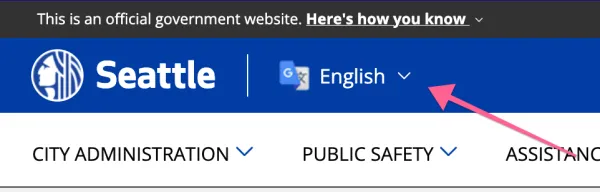
Why do people assume someone needing translation can read a word in a language other than the one they speak?
Why It's a Crutch
- Policy makers assume the widget provides access
- Community members already know how to use browser translation
- If you can find a page, you can figure out how to translate it
The real equity issue: finding content in the first place
The SEO Problem
Websites without translated content at alternate URLs are not fully indexed in target languages by search engines
People who speak other languages cannot use their language to search for your content
Minimum Recommendation
Automate translation using machine translation stored in the database for presentation at a unique URL
Content must be rendered as HTML, not by JavaScript in the browser
Section 3: Review Translations with Human Professionals
Machine translation needs human verification
Build Review Into the Workflow
- Automate the first pass (machine or AI translation) to save costs
- Route translations to human reviewers before publishing to ensure accuracy
- Government content carries legal and safety implications
- A bad translation isn't just embarrassing — it can cause harm
- Prioritize high-impact content: legal, safety, benefits to ensure the content is accurate and safe
Humans may need a review as well, especially for interface elements
When comparing a translation agency to Google Translate API for interface elements, Google did better!
— City of Portland translation project
Agencies typically translate documents with more context than short UI strings
Section 4: Help Search Engines (and AI) with Proper Metatags
Using hreflang to boost content relevance
How hreflang Works
- Link elements with
rel="alternate" - Language attribute like
hreflang="es" - Search engines give relevance to translations of high-ranking pages
Language and Region Codes
Portland.gov Example
<meta name="geo.placename" content="Portland" />
<meta name="geo.region" content="US-OR" />
<link rel="canonical" href="https://www.portland.gov/ />
<link rel="alternate" hreflang="x-default" href="https://www.portland.gov/" />
<link rel="alternate" hreflang="en" href="https://www.portland.gov/" />
<link rel="alternate" hreflang="es" href="https://www.portland.gov/es" />
<link rel="alternate" hreflang="vi" href="https://www.portland.gov/vi" />
<link rel="alternate" hreflang="zh-hans" href="https://www.portland.gov/zh-hans" />
<link rel="alternate" hreflang="ru" href="https://www.portland.gov/ru" />
Drupal Modules
- Metatag - Core metadata management
- Hreflang - Language alternate links
- Schema.org - Structured data for AI and search
Section 5: Index Content by Language
Improving site search for multilingual users
Another Client-Side Translation Failure
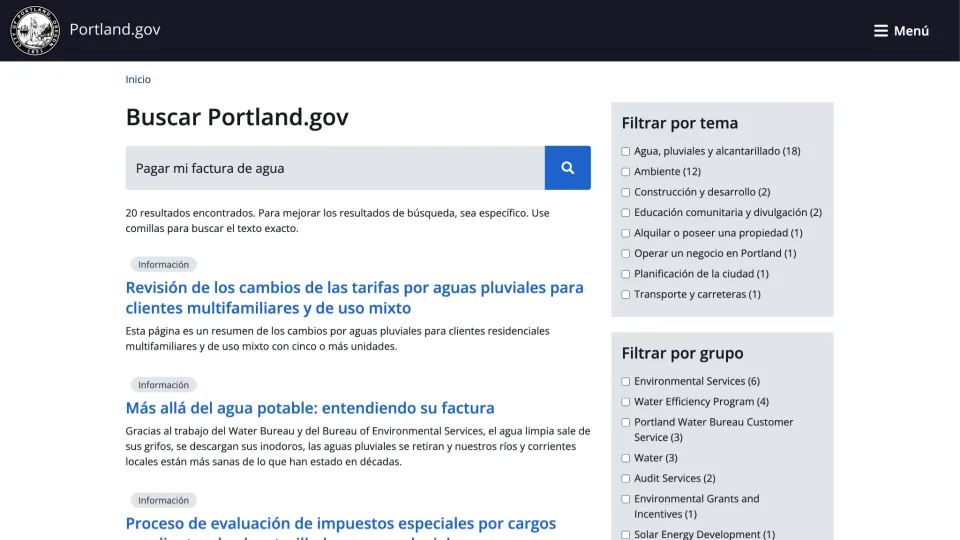
Sites using only client-side translation lose the ability to return search results in the target language
Would you find it acceptable if a site's search only returned occasional cognates or misspellings?
Language-Specific Challenges
- Unique grammar and syntax
- Different writing systems (alphabets)
- Unique characters and accents
If search is incomprehensible, usability is broken
Full Translation Enables
- Translated interface elements (forms, filters)
- Search results in target language
- Proper indexing of content
Portland.gov Search Example
Section 6: Design for Culture and Word Length
Beyond just translating text
Technical Considerations
- Right-to-left language support (Arabic, Hebrew)
- Word length variations (German words are long!)
- Character sets and fonts
Cultural Considerations
- Color meanings vary by culture
- Imagery appropriateness
- Tone and formality levels
Section 7: Keep Layouts Simple
Complex layouts cost more to translate
Simple vs Complex
Keep layouts simple for content that updates regularly
Section 8: Avoid Mixed Translation
Keep language consistent throughout the page
Example Problem
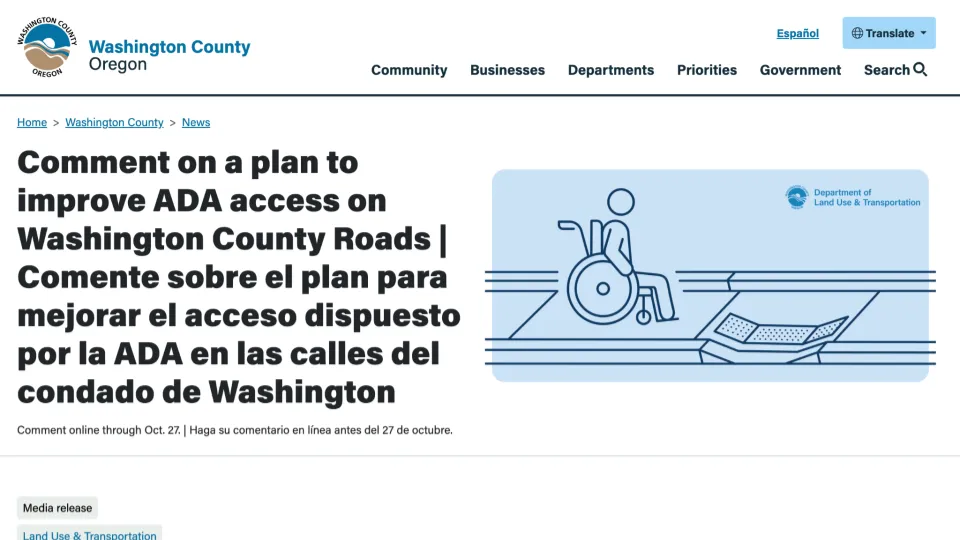
Mixing English and Spanish titles makes content difficult to read
Why Mixed Translation Fails
- Usability suffers for everyone
- Difficult for limited proficiency readers
- Confusing for native source language speakers
- Problems compound with more languages
Section 9: Plan Your Language Switcher
Help users understand available languages
Language Labels
Present language labels in the target language:
Users recognize their own language more easily
Two Approaches
Multnomah County Library Example

Sitewide navigation with language labels in target languages
Portland.gov Translation Menus
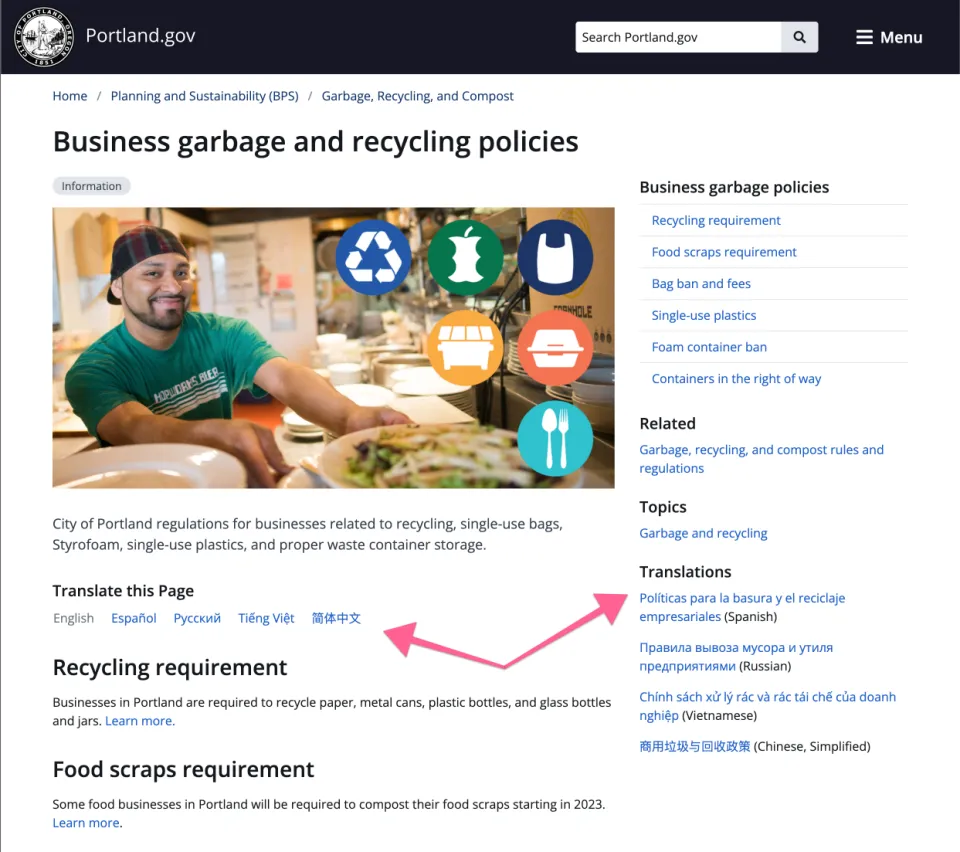
In-page links with language labels and translated titles
Section 10: Translate Your Media
Make sure you documents, images, and videos are in the target language
HTML First
- Prefer HTML content over downloadable files
- HTML is easier to structure for accessibility
- Screen readers handle HTML far better than PDFs
- Works better on mobile devices
- Files often fail on mobile
When PDFs are unavoidable, use the PDFa11y module to check accessibility
Dual Labeling Example
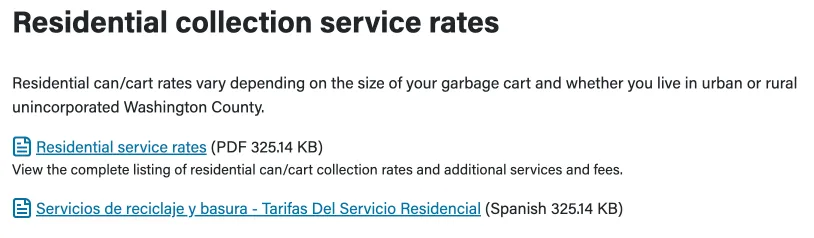
Label source language next to document name with file type and size
File Size Matters
Large file sizes are inequitable
Only those with enough data can download them
Avoid "click here" or "download now" - explain what will be downloaded
Translating Images and Video
Metadata that can be translated:
- Alternative text
- Transcripts
- Displayed titles
- Closed captioning
Drupal's Translation Management Tool helps track untranslated media
Section 11: Reduce Costs with Plain Language
Less text = lower translation costs
Reading Level Comparison
| Post-Graduate Level | 8th-Grade Level |
|---|---|
|
"Landscape design integrates ecological principles with aesthetic considerations to create harmonious outdoor spaces that serve both functional and experiential purposes..." |
"Landscape design is about planning and creating beautiful outdoor spaces like parks and gardens..." |
The simpler version has vastly less text to translate
Benefits of Plain Language
- Easier for people to understand
- Costs less to translate
- Costs less to maintain
- Better user experience for everyone
Section 12: AI and Translation
The future of automated translation
AI Translation Today
- AI translation is improving rapidly
- Translation via LLM is a mature AI use case
- ChatGPT, Claude sometimes create grammatically correct but unnatural passages
- This will improve
Drupal AI Translation
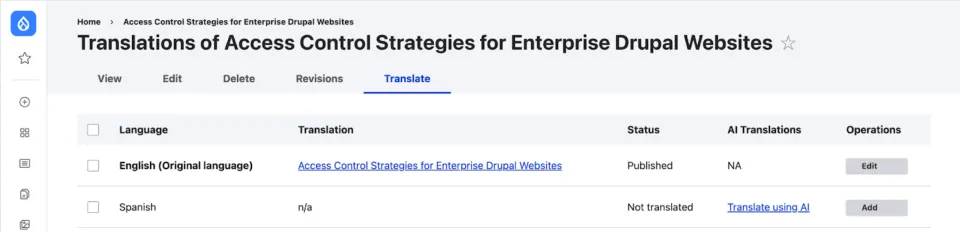
Drupal CMS includes basic "translate using AI" capabilities in the AI recipe
Future Possibilities
AI prompts can inject specific tone or cultural relevancy
A shift from traditional translation APIs toward AI platforms is coming
Strive to Be Better
- Delivering better services to vulnerable populations isn't easy
- Initial CMS investment is incremental compared to impact
- May not achieve perfection in one project
- Your website is a product that can continuously improve
By striving to be better, government organizations improve equity
Resources
Get Help
Need help implementing these best practices?
Connect with Josh Mitchell on LinkedIn
I've worked with vendors specializing in translation and localization
I can connect you to organizations that boost your translation efforts
Thank You!
Questions?
This work is licensed under a Creative Commons Attribution 4.0 International License

Session feedback